Just joined Google Plus (G+) and wondering where to start? Then sit back, relax and read through this post. Majority of the people are still waiting for the invite to get started as Google is testing through invite only at the moment. Whether you have the invite or still waiting for one it will be your comprehensive guide to when starting G+.
This post is designed to help you and me to understand how to start with G+ and lead you through a step-by-step process for getting started on G+
Step 1: How to Access Google Plus
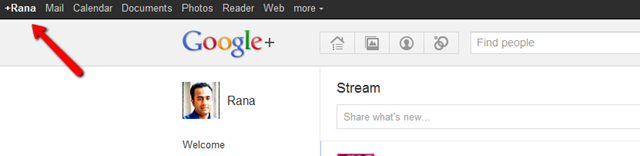
Once you received your invite to join G+, you will be asked to enter your name, e-mail, date of birth and gender to get started. After completing these details you will be logged in and can find your account in the top left corner of your browser as shown in the screen cast below.
Step 2: Complete Your Profile
Google plus is launched for personal identities only at present. If you have started your account with business name then you are most likely violating the Google’s terms and conditions. Google is already closing down such accounts. Therefore, it is wise to start right at first place.
Your Bio
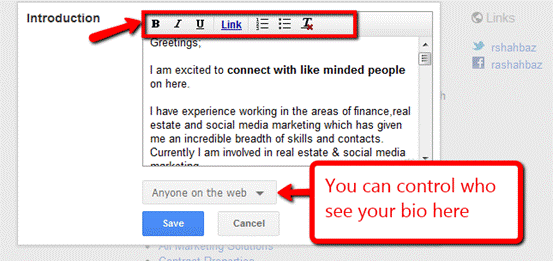
This is where you get the opportunity to tell the world who you are and what you do. I really miss these tools in most social networks including Facebook and LinkedIn. I believe presentation plays a big part in your success. Here you can polish your bio using highlighted tools in the screen shot.
Using these tools you can do the following:
- Make the text bold, Italic and Underline
- Hyper link text
- Use Bullet Points
- Remove the formatting with one click
Plus you can control who should see your bio as show.
Add a Picture
Can you imagine social networking profile with out a picture of you? I recommend having a semi professional relaxed picture will do the trick. Picture is your first impression in the social networking makes it work for you.
Privacy Settings
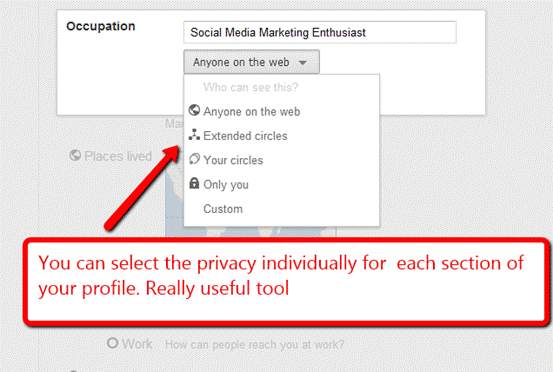
Another great littlie tool that you can select each of the following information individually to show or hide from different people in your circles.
- Bragging rights
- Occupation
- Employment
- Education
- Relationship
- Looking for
- Gender
Step 3: Manage Contacts
I heard few people saying that they are not on Facebook because of privacy and they don’t want to mix work life with personal things. Facebook has lists to control privacy concerns but Circles in Google plus makes it really easy to maintain this. Content shared with one circle cannot be viewed by members in other circles.
Step 4 Adding Links
You can add links to your other social media profiles, blog and website by going to your profile > edit profile > this will activate the link button. By clicking on links button after that you can add links to your social media profiles.

Step 5: Understand How +1 Works
Google +1 button works similar to Facebook like button, but I think it will be lot more powerful and useful with the time because of the following reasons.
- You can see things recommended by your friends in the search results with +1 button
- All your +1’s will be stored in the +1 tab under your Google plus profile, you can select to show or hide this tab
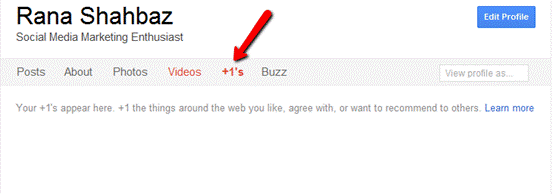
Just started therefore, I did not have any +1 yet on my account.
Step 6: How to Filter Your News Feed

By selecting the particular circle here you can check the news feed of that particular circle and also update status only with that circle without sharing your status update with rest of the world.
Step 7: How to Send a Direct Message
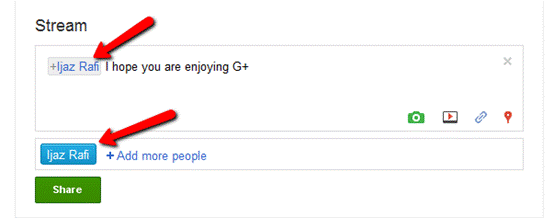
Like twitter starting with @ sign before the user name, you can send users direct / private messages. By clicking on add more people, you can send direct/private messages to multiple people.
Step 8: Notifications

You can go to the right top corner in your browser and click on the round circle; it will open the drop down menu. When you will select the Google + settings option it will take you to the following screen.
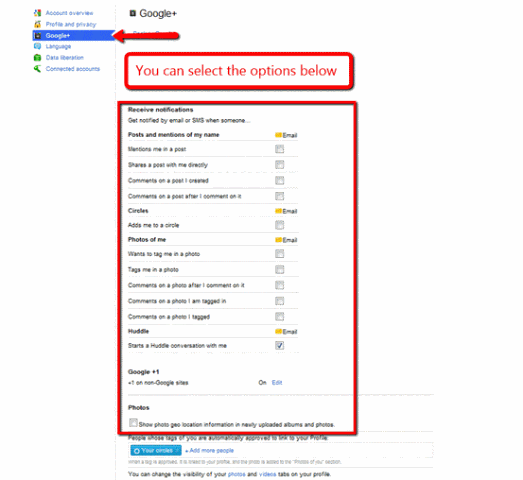
This is down to individual choice how you want to set this up. Ticking too many options can lead to flood of e-mails.
Your Turn
I hope this will be helpful to set up your profile and get started on Google plus.
As Google is testing the interface at the moment and few things may change in the future or may be I missed something here feel free to add your experiences and thoughts in the comments section below.
On April 2, 2019, Google shut it down the consumer (personal) version of Google+, a social network by Google. If you have a G Suite Account, as part of your work or school, you can continue to use Google+ within your organization.


great going with Google+…found many things which were not clear when i was trying to use G+. Thanks Rana for your help through this wonderful post….
Thanks Nabeel, I am glad you find it useful, feel free to spread the love and enjoy Google +
Hey Rana, I have been deal with this problem too. Many of my friends need a start up guide that would explain to them in simple terms how exactly everything works. Because I kept having the same conversation explaining everything to everyone I decided to make my own guide. I created a slide show in Google+ that is meant to be “The Guide” that all the new people should see to get them started. I think you would be a fan. https://plus.google.com/114831291174925522786/posts/CoVGAath7TX
What is this Bragging Rights in “Your BiO” secotion?
Great guide for beginners at G+. Thanks for the help……
Good work. I bet it took a long time to put it together. I didn’t know you could hide people in circles. There are some people I’d like to hide on my FB account.
Thanks for appreciating the my efforts Ramiro, Still the early days we will learn new things quite often with Google Plus I guess
Great information. And thank you for taking time to research, compile and share such valuable info. Now, I just need an invite to join G+ and I can implement all your ideas!
why google+ don´t create “secret circles” let me explain, if somebody has gotten my password (my girlfriend for example) my secret contacts & posts wont be able to see them beacause i need enter another password to activate this secret circles, and if the password for secrets is enter invalid, the system shouldn’t notify it, so nobody knows if there is or isn’t a secret circle, sorry for my poor english, i’m a student of computer science in mexico, bye
Just brilliant Rana! I’ve been on a whole 12 hours and I’m already feeling confident that I can now find my way around (albeit tentatively) and your blog has just helped to confirm I’m on the right track. Without social media guru’s like you – the world would be a much sadder and less communicative place! On with the pioneering ….. !
I am glad that you found my blog helpful Carole. I don’t class myself as a Social Media Guru, I am a social media marketing enthusiast like yourself.
Feel free to get back and ask any question you may have so we both can learn more about social media 🙂
i’m not very computer wise,but your info takes the fear away
I do not have a computer nor any computer skills , about a month ago my husband and I got an IPad and I am completely lost . I managed to get a Google plus somehow and it looks like fun but I have no idea how to update my profile or rather create it, or if it is even possible using only an IPad or do I have to get a PC? Right now my profile contains only gender and email and looks really empty, please help!
Hi there I am so excited I found your blog page, I really found you by mistake, while I was looking on Bing for something else, Anyways I am here now and would
just like to say kudos for a marvelous post and a all round exciting blog (I also love the theme/design), I don’t have time to look
over it all at the moment but I have bookmarked it and also added in your
RSS feeds, so when I have time I will be back to read more, Please do keep up the superb work.